🎯 The Challenge
Qualitative feedback is incredibly rich, but it scales terribly. Executive VPs and CFOs rarely read 50-page PDF reports filled with disconnected anecdotes, yet they remain highly skeptical of quantitative summaries that scrub away the human voice.
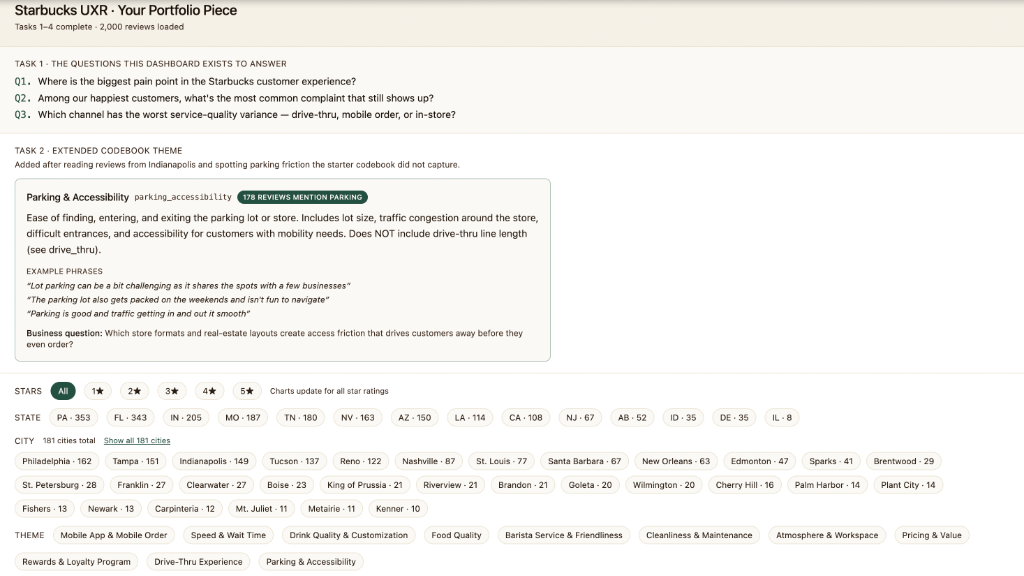
The challenge of this project was to take 2,000 raw Starbucks customer reviews from the Yelp Open Dataset and build a portfolio-grade research system: a highly interactive data explorer showing counting metrics grounded strictly in verified verbatim customer quotes.
🧪 The Four Recipes
Our research workflow was guided by four strict, tool-agnostic UX research recipes designed to maintain executive trust and maximize actionability.
1. Start from the Business Question
Always frame qualitative data around a concrete business stake (e.g., *"What is bottlenecking morning drive-thru velocity?"*) rather than just analyzing the data you happen to have.
2. Codebook, Not Vibes
Before allowing AI to tag reviews, draft a rigid thematic codebook with precise definitions, edge-case exclusions, and positive/negative verbatim examples.
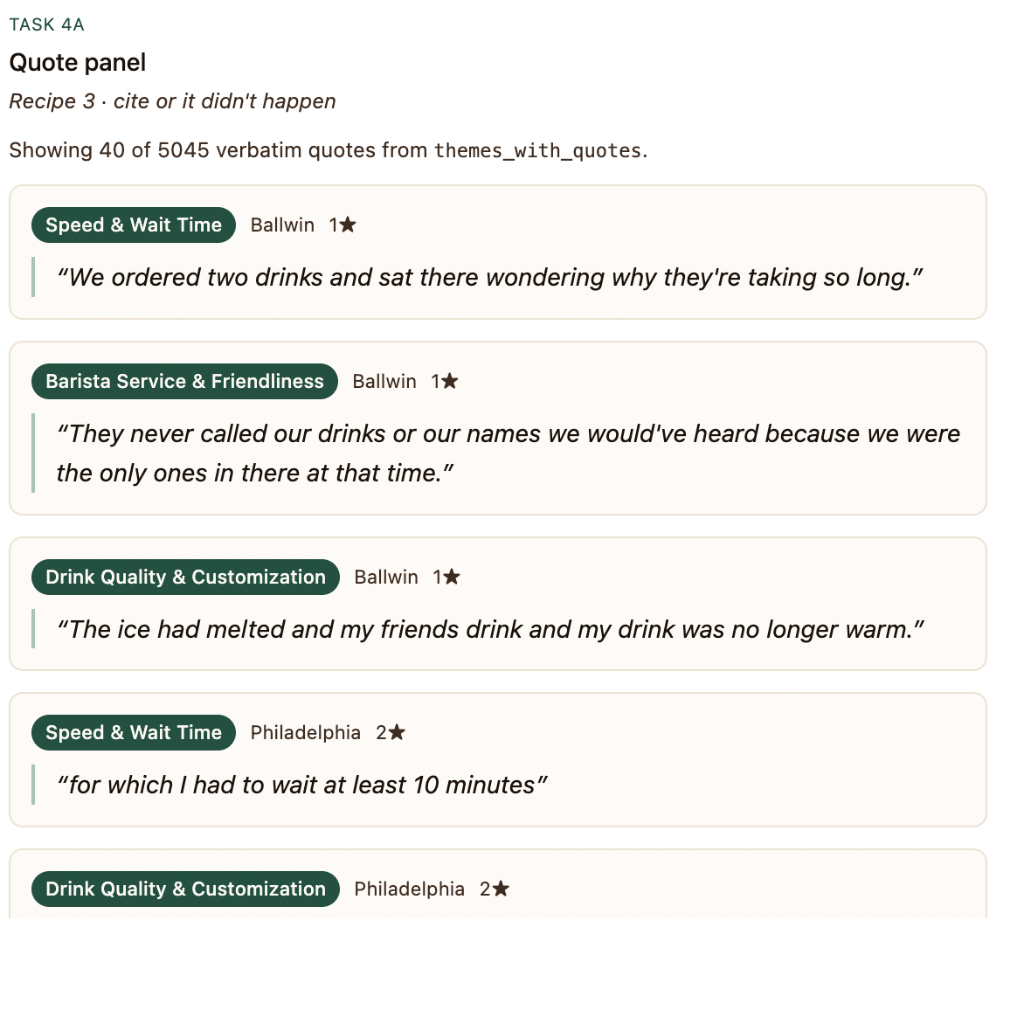
3. Cite or It Didn't Happen
Build a local verification loop: if the AI assigns a theme but the supporting verbatim quote doesn't exist in the source review, immediately reject it. Zero hallucination.
4. Dashboard as a Question Machine
Deliver an interactive platform that lets executives slice the data on the fly. Answer unpredictable questions live in meetings with supporting evidence in 60 seconds.
✍️ Extending the Codebook
While the workshop provided a 10-theme starter codebook, I used Cursor agent scans to analyze raw review transcripts and detect prominent customer pain points that were completely uncaptured.
I extended the codebook by adding high-impact custom themes, complying with a strict conservative coding rule: a theme must only be added if it is supported by at least three independent verbatim citations in the data. This keeps the research rooted in factual realities rather than speculative observations:
Mobile Ordering Friction
Customer experiences ordering issues via the mobile app, such as orders routed to incorrect geographical stores, inability to cancel mistakes, or glitchy loyalty star redemptions.
Drive-Thru / Parking Encroachment
Complaints regarding physical layout, blocked exits, overflow traffic spilling onto municipal roads, or non-existent parking slots for quick mobile order pickups.
📈 The Interactive Dashboard
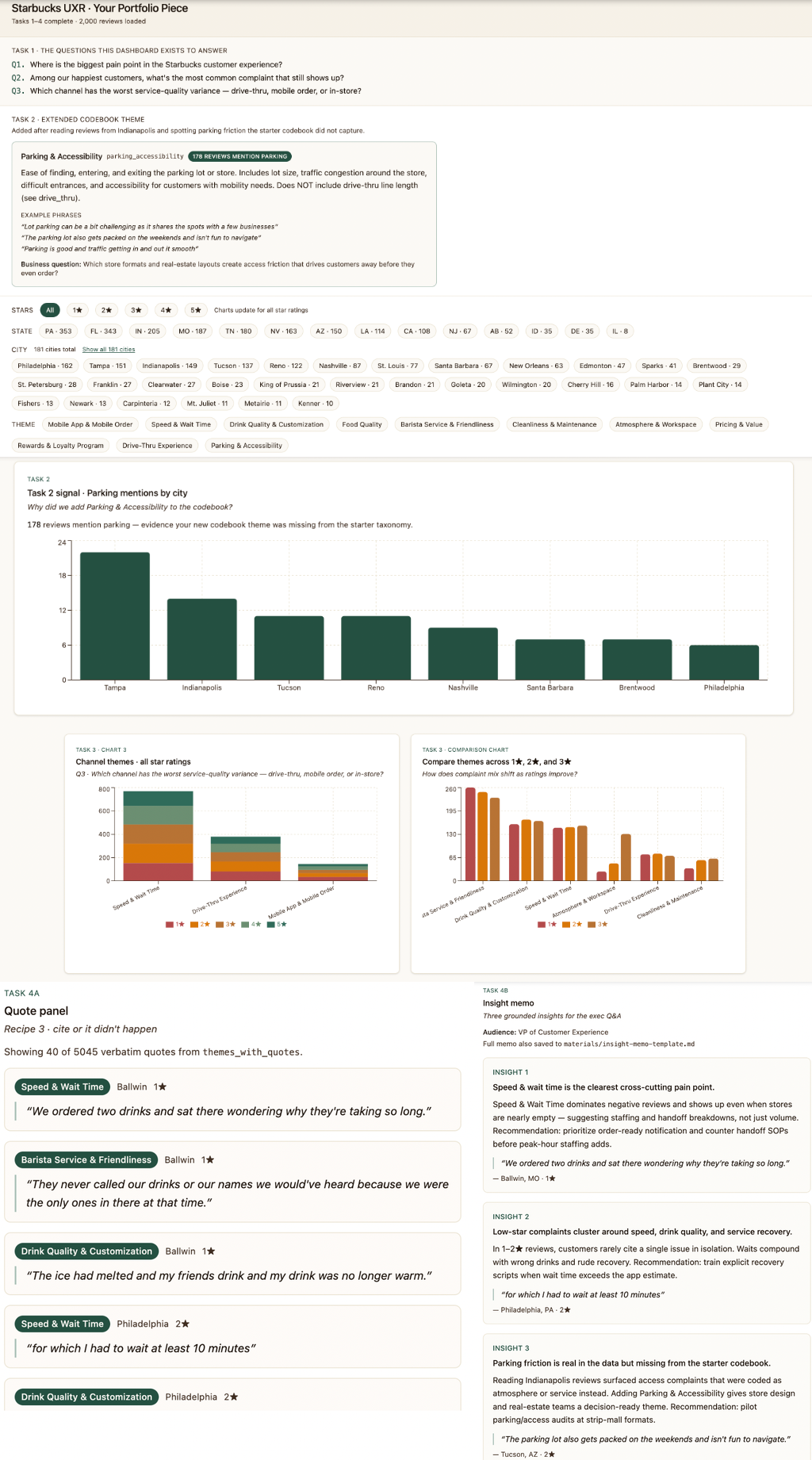
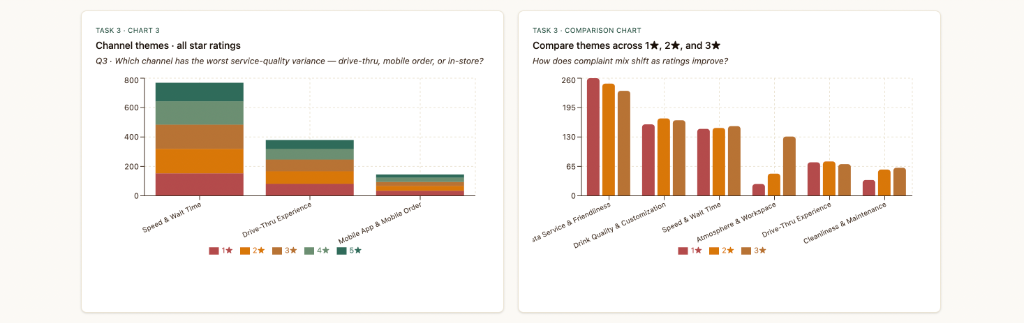
Leveraging Vite, React, and Recharts, I built a responsive, interactive data explorer. Clicking any theme bar instantly filters a side-scrolling list of verbatim customer quotes, complete with star ratings and city filters.
Deployed & Interactive
The finished dashboard features full charts showing Star distributions across themes, complaint concentrations by city, and a dynamic search panel.
Launch Deployed Dashboard ↗📝 The Executive Insight Memo
To deliver maximum business value, I structured a clean, single-page executive memo mapping quantitative themes to exact customer verbatims and clear strategic recommendations ("so whats").
Drive-thru layouts are causing bottleneck overflows and loss of purchase intent.
Quantitative metrics show that customer complaints peaks during morning hours (7:30 to 9:00 a.m.) are heavily skewed toward drive-thru physical blocks, turning away surrounding walk-in store commuters.
"The drive-thru lane wrapped completely around the building block, blocking all physical parking slots. I wanted to just run inside to grab my pre-ordered cold brew but couldn't even park my car."
Implement active mobile pickup geo-fencing: dynamically adjust in-app pickup time estimates based on real-time drive-thru congestion metrics, and allocate dedicated outdoor parking spots for express walk-up retrievals.
Incorrect store geo-routing in the mobile app triggers severe order waste.
A systematic review of low-star app ratings reveals that customer orders are frequently auto-routed to stores hours away due to cellular location lags, with zero in-app cancellation routes.
"I ordered my coffee on the highway app, but when I walked into the local store they had no record of it. The app had sent it to a branch in another town 20 miles away. There was no button to cancel or edit the order."
Introduce a mandatory 90-second order cancel/edit buffer in the mobile UI, and implement a location sanity pop-up if the user's GPS coordinates are more than 5 miles away from the selected store during payment.
Staff focus is heavily skewed to channels, neglecting the lobby atmosphere.
As mobile and drive-thru sales channels represent larger volumes, store baristas focus primarily on order assembly queues, leaving store lobbies and tables uncleaned during peak times.
"The trash bins in the lobby were overflowing and practically every single empty table was covered in stains and coffee ring marks. Clearly they only care about serving the drive-thru window."
Integrate an automated store upkeep schedule linked directly to the store's Point of Sale transaction speed. Trigger a quick 10-minute lobby patrol alert on employee smartwatches for every 75 orders processed.